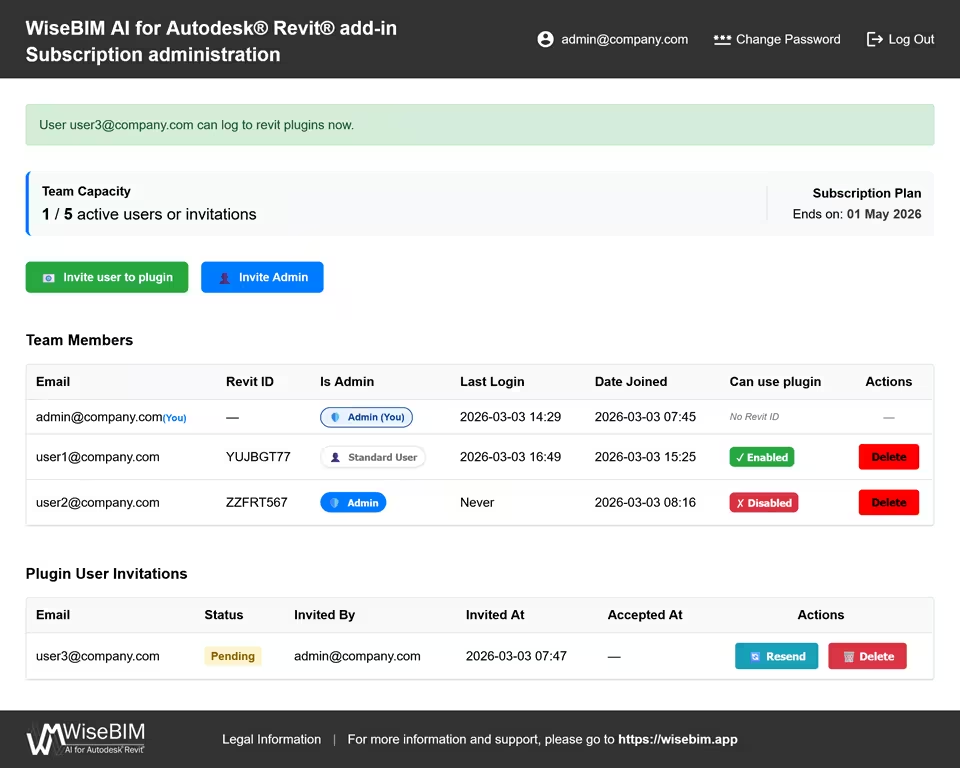
User administration interface
The license management tool is an online interface accessible only for administrators of the company.
All administrators of the company that have access to the manager share the same informations.
Invite a new user
A new user can be invited as an
- Administrator by clicking on Invite Admin
- Add-in user by clicking on Invite user to add-in
In all cases, an email will be sent to the user. The administrator validation email contains the link to initialize the password and the user invitation contains the key associated with the user license.
All invitations are listed in the bottom of the administrator dashboard. The invitation will disappear when the validation has been accomplished by the user.
Activation of license
When a user receives the email that contains the license key he simply has to run Revit® software and use the key string within the add-in.
After validating the key, the user will be added in the Team members list.
To deactivate a user license, one has simply to click on the green Enabled button in the line of the corresponding user. The button switch into a red one name Disabled. Clicking again on the button will activate the key if the number of available seats is sufficient.
Deletion of user
Any user account can be removed permanently by clicking on Delete button.
After being delete, the user could no longer access to the license manager if he had an administrator account or use the add-in if he had a license key.
An administrator can not disable its own account. To remove completely the company account, please contact the support.